
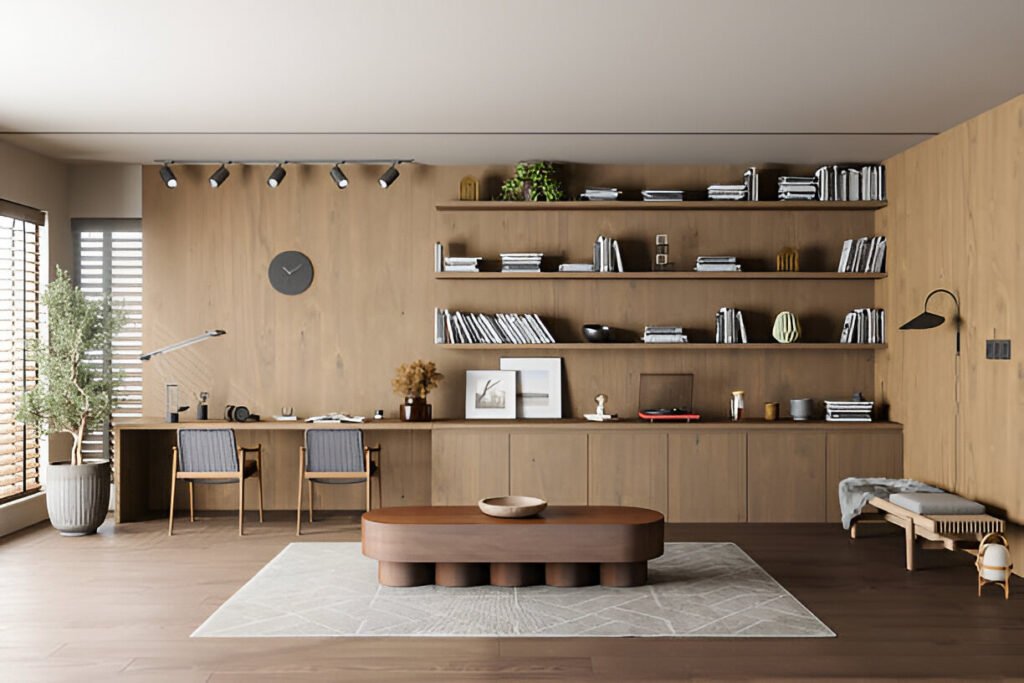
A dedicated workspace becomes essential when casual setups no longer support sustained productivity.
A minimalist home office setup focuses on keeping only daily-use items visible while storing everything else out of sight, creating an environment optimized for focus rather than display.
Stanford research shows proper home setups boost productivity by 13%. Most of that comes from reducing visual clutter and creating a space where you can actually focus.
Key Takeaways:
- Choose a quiet location with natural light to reduce eye strain and improve mood
- Invest in an ergonomic chair with lumbar support—your back will thank you later
- Use wireless devices and cable management to eliminate visual distractions
- Stick to neutral color palettes that won’t compete for your attention
- Apply the daily-use test: if you don’t use it every day, it doesn’t belong on your desk
Minimalist Home Office Setup Ideas and Tips
Choosing the Right Space
Select a Quiet, Functional Location
Find a spot away from high-traffic areas. Working near the kitchen or living room means constant interruptions.
A quiet corner or dedicated room where you can shut the door works best. If you take lots of calls, background noise matters even more.
Natural Light and Layout Planning
Position your desk perpendicular to windows. This gives you natural light without screen glare. Natural light regulates your circadian rhythm and keeps you alert without extra coffee.
Glare control is critical. Facing a window directly requires constant adjustments to screen brightness. Perpendicular placement provides light benefits without causing reflections.
Mirrors amplify available light. Place one opposite your window, and your small office feels twice as big.
Essential Furniture for Minimalism
Desk Choices That Complement Minimalist Aesthetics
Floating desks mount to walls, creating a clean hovering look. The downside is limited weight capacity, about 50 to 100 pounds. They work best for laptop-only setups or single monitors.
Wall-mounted desks offer flexibility for small spaces. Compact tables provide greater weight capacity and mobility.
Standing versus sitting is a debate worth having. Harvard research shows standing burns 88 calories per hour compared to sitting.
But standing all day isn’t the solution. The pattern that works involves alternating every 30 minutes.
Get an adjustable standing desk if you’re going that route. Fixed-height models sound good until you’re tired and want to sit.
For desk dimensions, a 48-inch desk handles most single-monitor setups. Dual monitors need 60 inches minimum. Don’t go bigger because extra space becomes a clutter magnet.
Ergonomic Seating and Comfort
A good ergonomic chair needs adjustable lumbar support, movable armrests, and customizable seat depth.
Lumbar support is non-negotiable. Your lower back has a natural curve your chair must support.
Without it, you’ll slouch within an hour. Breathable materials prevent sweating during long sessions. Mesh backs provide support while circulating air.
For proper posture, feet should rest flat with knees at 90 degrees. Elbows should also hit 90 degrees when typing. If your desk is too high, get a footrest.
Smart Tech and Gear
Minimalist Tech Essentials
Keep only the core devices you actually use. For most people, that includes a laptop or desktop, monitor, keyboard, and mouse, with everything else remaining optional.
Dual monitors sound productive, but they’re not always worth it in a minimalist setup. Two screens take up a ton of desk space and double your cable management headaches.
If your work genuinely requires multiple windows open at once, such as coding or video editing, dual monitors make sense.
For users who primarily handle email and documents, a single ultrawide monitor provides equivalent screen real estate with a cleaner aesthetic.
Dual monitors require specific spatial considerations. You need at least 60 inches of desk width to work comfortably, plus a good monitor arm to prevent them from taking up all your desk space. Limited space makes a single high-quality monitor the superior choice over two mediocre ones.
Cable Management and Wireless Solutions
Cables are the enemy of minimalist setups. They create visual noise that distracts you, even when you’re not consciously aware of them. Research shows that organized environments can boost productivity by up to 20%. A significant portion of that is simply getting cables out of sight.
Under-desk cable trays are your first line of defense. These metal baskets mount to the bottom of your desk and hide your power strip plus all the excess cable length. Mount your power strip inside the tray, plug everything in down there, and suddenly you’ve got a clean desktop.
Cable sleeves bundle multiple cords together into one neat tube. Use these for cables that have to run along your desk, like from your monitor to your computer. The bundled look is way cleaner than individual cables snaking everywhere.
Wireless keyboards and mice eliminate two of the most visible cables immediately. Modern wireless peripherals have gotten good enough that there’s no performance difference for regular office work. You’ll need to charge them occasionally in exchange for complete cable elimination.
Wireless charging pads consolidate your phone charging setup. Instead of having a cable permanently plugged into your desk, you just drop your phone on the pad, eliminating one permanent cable from your desk setup.
Storage and Organization for Clarity
Hidden and Vertical Storage
Drawers are essential for keeping your desktop clear. If your desk doesn’t have built-in drawers, get a small filing cabinet or drawer unit that fits underneath. This is where pens, notebooks, chargers, and all the other stuff you need occasionally goes.
Floating shelves work great for books and minimal decor, but don’t overload them. Three to five items per shelf max. Any more than that and you’re back to visual clutter.
Vertical storage takes advantage of wall space instead of eating up your limited desk area. Wall-mounted organizers, pegboards, and shelving units keep things accessible without crowding your workspace.
Filing and Digital Systems
Prioritize digital storage over physical filing. Scan documents instead of keeping paper copies whenever possible. Use cloud storage like Google Drive or Dropbox for easy access from anywhere.
For the paper you absolutely need to keep, use a simple filing system. Label folders clearly: “Tax Documents,” “Insurance,” “Receipts.” Avoid excessive categorization because broad groupings prove more maintainable than dozens of subcategories. Use search to find specific files instead of trying to remember which folder you saved something in.
Digital file organization follows the same principle. Create broad folders, not dozens of tiny subcategories. “Work,” “Personal,” “Finance” provides sufficient organization. Use search to find specific files instead of trying to remember which of 47 folders you saved something in.
Aesthetics That Support Focus
Neutral Color Palettes and Textures
Stick with whites, beiges, and grays as your base colors. These neutral tones create a calm visual field that doesn’t compete for your attention. Bright colors can be energizing in small doses, but covering your entire office in them becomes mentally exhausting.
Subtle textural accents add warmth without creating clutter. A wood desk against white walls. A gray fabric chair. These variations in texture keep the space from feeling sterile while maintaining the minimalist vibe.
Minimalist Decor That Isn’t Distracting
The functional minimalist formula includes one plant, one art piece, and one statement lamp to provide sufficient visual interest without clutter. Select each item intentionally and place it where it serves a purpose.
Plants improve air quality and add life to your space, but don’t turn your office into a greenhouse. A single medium-sized plant on your desk or a larger floor plant in the corner works perfectly.
Framed art should be something you actually like looking at, not just something to fill wall space. Abstract pieces or simple photography work better than busy, detailed images that pull your focus.
Balance functional items and decor carefully. Your desk lamp serves a function, but it can also be a design element. Monitor stands and keyboards offer similar opportunities to blend utility with aesthetic value.
Mirrors create the illusion of more space and reflect light around the room. A large mirror on one wall can make a small office feel significantly bigger. Position it to reflect natural light or an interesting view, not just a blank wall.
Lighting Strategies for Productivity
Task vs Ambient Lighting
Adjustable desk lamps let you direct light exactly where you need it. Look for lamps with adjustable brightness and color temperature. Cool white light (5000K-6500K) keeps you alert during the day. Warm white light (2700K-3000K) is easier on your eyes in the evening.
Layered lighting combines multiple light sources at different levels. Overhead lighting provides general illumination. A desk lamp handles task lighting. Maybe a floor lamp in the corner for ambient light. This variety accommodates different tasks, providing bright focused light for detailed work and softer ambient light for video calls.
Natural and Artificial Harmony
Maximize daylight first, then supplement with artificial lighting. Natural light is free and better for your circadian rhythm than any artificial alternative. Position your desk to take advantage of it.
Soft, warm LEDs work best for supplemental lighting. Harsh fluorescent lighting often causes eye strain and poor color rendering, making quality LED alternatives worth the investment. Invest in quality LED bulbs with good color rendering.
Position lights to reduce shadows and screen glare. Your desk lamp should come from the side, not from behind your monitor where it creates reflections. If you’re right-handed, put it on your left to avoid shadows when writing.
Layout Options by Space Constraint
Small Space Solutions
Closet offices, often called “cloffices,” have become popular for a reason. A 2-by-5-foot closet is just enough room for a floating desk and a chair. Remove the closet doors or replace them with curtains, and you’ve got a dedicated workspace that disappears when you’re done.
Corner desks maximize awkward spaces. That dead corner in your bedroom provides a perfect spot for an L-shaped desk that gives you plenty of work surface without taking up wall space you might need for other furniture.
Fold-away setups work if you absolutely must share space. Wall-mounted desks that fold up, portable laptop stands, anything that lets you pack up quickly when you need the room for something else.
Larger Room Configurations
If you’ve got a dedicated room, create balanced zones. Your main work area gets the best light and ergonomic setup. A secondary area with a comfortable chair and good reading light for breaks or creative thinking.
Some people benefit from separate zones for different types of work. A desk for focused computer work. A small table for writing or sketching. A comfortable chair for reading or phone calls. If you have the space, these distinct areas help you mentally shift between different types of tasks.
Routine Habits to Maintain Minimalism
A minimalist office requires maintenance. It won’t stay organized by itself.
Do a daily clean sweep at the end of each workday. Clear everything off your desk. Put items back where they belong. This takes maybe five minutes but prevents clutter from accumulating.
Weekly reorganizing habits keep things in check. Go through your drawers. Toss expired documents. Consolidate duplicate items. File away anything you’re done with.
Quick checklists help maintain the reset. An effective weekly checklist includes clear desk, file papers, check cable management, wipe down surfaces, and water plant, completing the weekly maintenance cycle. Consistent completion of these five tasks maintains long-term workspace functionality.
Summary and Minimalist Checklist
Setting up a minimalist home office comes down to intentional choices about what you keep visible and what you hide.
Core Setup Elements:
- Dedicated quiet space with natural light
- Adjustable ergonomic chair with lumbar support
- Desk sized appropriately for your work (48-60 inches)
- Single monitor or laptop setup
- Wireless keyboard and mouse
- Under-desk cable management tray
- Neutral color palette (white, beige, gray)
- One decorative element (plant, art, or lamp)
- Adequate task lighting (adjustable desk lamp)
- Hidden storage (drawers or filing cabinet)
| Essentials | Optional Enhancements |
| Desk | Standing desk converter |
| Ergonomic chair | Footrest |
| Primary monitor | Second monitor |
| Desk lamp | Floor lamp |
| Cable tray | Monitor arm |
| One storage unit | Additional shelving |
Quick Implementation Timeline:
Week 1: Choose location, clear space, apply daily-use test to items Week 2: Order desk and chair, plan layout Week 3: Set up furniture, install cable management Week 4: Add lighting, final organization, establish maintenance routine
For ongoing workspace optimization strategies, weekly productivity insights are available through our newsletter.
Frequently Asked Questions
1. How do I design a home office that inspires productivity?
Start with removing distractions. Your office should have one clear purpose: work. That means no TV, no gaming setup, no laundry pile in the corner. Keep the space dedicated to work tasks only.
Natural light is your best friend for productivity. Position your desk near a window but perpendicular to avoid glare. If natural light is limited, invest in full-spectrum LED bulbs that mimic daylight.
Ergonomics directly impact how long you can work comfortably. An uncomfortable chair or poorly positioned monitor will tank your productivity within hours. Set up your desk so your elbows are at 90 degrees, your feet are flat on the floor, and your monitor sits at eye level about an arm’s length away.
Minimize visual clutter by using the daily-use test. Everything on your desk should be something you use every single day. Pens go in a drawer. Extra monitors get removed if you’re not actually using them. Reference books go on a shelf. Only your active work items stay visible.
2. How can I choose between a standing desk and sitting desk for a minimalist office?
Neither option is perfect on its own. Standing all day puts strain on your legs and lower back. Sitting all day compresses your spine and slows circulation. The research is clear: alternating between positions is the healthiest approach.
An adjustable standing desk gives you that flexibility. You can sit for tasks that require deep focus, stand during phone calls or lighter work, and switch whenever you start feeling uncomfortable. Most people find a 30-minutes-sitting, 30-minutes-standing rotation works well.
If adjustable desks are outside your budget, consider a desk converter. These units sit on top of your regular desk and raise your keyboard and monitor to standing height. They’re not as smooth as electric standing desks, but they’re way more affordable.
For strictly sitting desks, focus on getting the height exactly right. Your desk should let your elbows rest at 90 degrees while typing. Most desks are 28 to 30 inches tall, which works for average height people. If you’re taller or shorter, you might need a custom solution or an adjustable desk regardless.
3. How can I make my workspace more minimalistic and productive?
Apply the minimalist principle ruthlessly: remove everything from your desk, then only put back items you use daily. Be honest with yourself. That stack of business books you’re “going to read someday” belongs on a shelf, not your desk.
Cable management makes a massive difference in perceived cleanliness. Get those cables off your desk and out of sight using under-desk trays and cable sleeves. The visual impact of a cable-free workspace is significant.
Use vertical storage instead of horizontal. Wall-mounted shelves and pegboards keep things accessible without eating up desk space. This is especially important in small offices where every square inch of desk surface matters.
Stick to a neutral color palette. Too many colors create visual noise that’s distracting even when you’re not consciously noticing it. Whites, grays, and natural wood tones create a calm environment that supports focus rather than fighting for attention.
Establish a daily reset routine. Spend five minutes at the end of each day clearing your desk and putting things back where they belong. This habit prevents clutter from accumulating and ensures you start each morning with a clean workspace.