
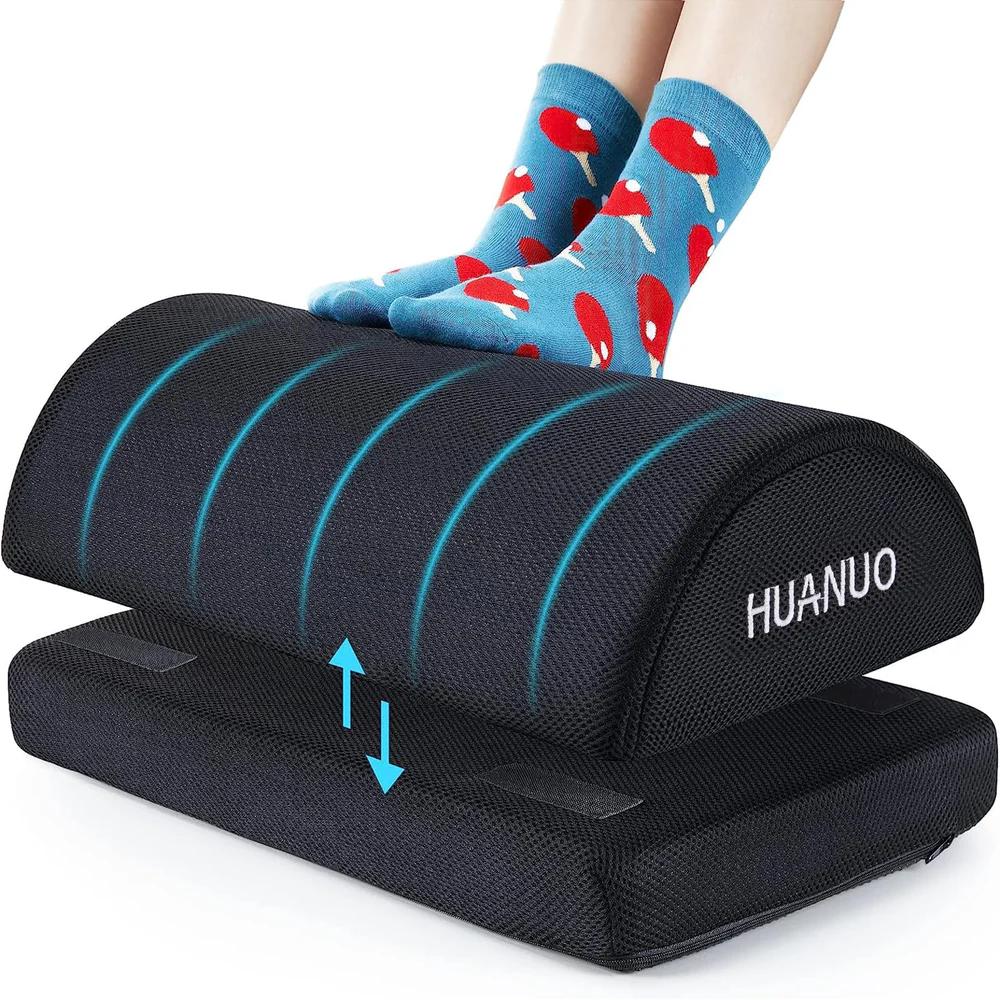
With 32.6 million Americans now working remotely, home offices have become permanent fixtures rather than temporary setups.
But your feet are the foundation of your entire sitting posture, and when they’re not adequately supported, everything above them suffers.
Footrests are the missing piece that connects your lower body to proper ergonomic alignment, improves circulation, and prevents back pain that’s been plaguing your workday.
Quick Takeaways:
- Footrests support proper spinal alignment by maintaining the 90-90-90 posture model.
- Remote workers face higher ergonomic risks due to improvised setups and longer sitting hours.
- Different footrest types serve specific needs, from fixed platforms to dynamic rockers.
- Proper setup requires matching footrest height to your desk, chair, and body proportions.
- Benefits include reduced back pain, improved circulation, and decreased leg fatigue.
What Is a Footrest, and How Does It Work?
Basic Definition and Core Purpose
A footrest is an elevated platform that supports your feet when seated at a desk. It’s different from a footstool in both design and intent.
Footstools are typically casual furniture pieces for relaxation, while footrests are ergonomic tools engineered for workspace support.
The distinction matters because footrests incorporate specific angles, adjustability features, and surface textures designed for prolonged sitting.
Static footrests maintain a fixed position and height, offering consistent support throughout your workday.
Adjustable models let you modify height and tilt to match your body’s needs and your desk configuration.
How Footrests Interact With the Human Body
Your feet do more than just rest on a footrest—they become anchors for your entire seated structure.
When your feet press against a stable surface, your body achieves what ergonomists call a “closed kinetic chain.” This creates stability that travels upward through your legs, hips, and spine.
Footrests influence pelvic tilt directly. When your feet dangle, your pelvis rotates backwards, flattening your lower back’s natural curve.
A properly positioned footrest keeps your knees slightly higher than your hips, which tilts your pelvis forward and maintains lumbar lordosis—that essential inward curve.
The platform also redistributes pressure across your thighs and buttocks. Without this redistribution, your body weight concentrates on your sit bones and thigh backs, compressing tissues and restricting blood flow.
Why Does Foot Position Matter When Sitting?
The 90-90-90 Posture Model
| Joint | Target Angle | What It Does |
| Ankles | 90° | Feet flat, neutral ankle position |
| Knees | 90° | Thighs parallel to floor |
| Hips | 90° | Maintains spinal S-curve, minimizes muscle tension |
Your body functions as an interconnected system. Feet positioning affects knee angles, which influence hip placement, which determines pelvic tilt, which controls spinal curvature, which impacts neck and head position. Change one element, and you trigger a cascade throughout the chain.
Research shows that angled footrests increase workers’ use of the chair backrest and improve pelvic rotation, leading to better spinal positioning.
Circulation, Nerves, and Muscle Load
Blood flow in your lower extremities relies partly on muscle contractions that push blood back toward your heart. Dangling feet or cramped leg positions impede this process.
Your calf muscles can’t pump effectively when your legs hang unsupported or when your knees compress blood vessels.
The sciatic nerve can experience pressure when your thighs press against a chair edge without proper support distribution.
Your muscles also maintain constant tension to stabilize your body when your feet lack support.
This static muscle fatigue accumulates throughout the day, contributing to exhaustion after hours at your desk.
Do You Need a Footrest? Quick Assessment
Check symptoms that apply:
- [ ] Feet don’t reach floor at proper typing height
- [ ] Lower back pain after 2+ hours sitting
- [ ] Afternoon foot/ankle swelling
- [ ] Leg numbness or tingling
- [ ] Under 5’6″ tall with standard desk
- [ ] Use dining table or kitchen chair
- [ ] Sit 4+ hours consecutively daily
Results: 3+ symptoms = footrest likely beneficial | 1-2 = worth testing | 0 = may not need
What Work-From-Home Problems Do Footrests Solve?
| Problem | How Footrest Solves It | Expected Outcome |
| Dangling feet | Provides stable elevation | Achieves 90-90-90 posture |
| Lower back pain | Elevates knees, tilts pelvis forward | Preserves lumbar curve |
| Swollen feet | Improves blood return | Reduces pooling, swelling |
| Leg numbness | Redistributes pressure | Eliminates tingling |
| End-of-day fatigue | Reduces static muscle tension | Less exhaustion |
| Hip tightness | Maintains proper hip angle | Reduced discomfort |
Dangling Feet and Poor Desk Height Matches
Standard desk height sits around 29-30 inches, which works for someone roughly 5’9″ to 6’0″ tall.
If you’re 5’4″, your feet won’t reach the floor when your chair is adjusted to the correct height for typing.
Dining tables repurposed as desks present the same challenge. They’re built for eating, not computing, and lack the ergonomic features that make extended work sessions comfortable.
Lower Back Pain and Hip Discomfort
Posterior pelvic tilt happens when you sit without proper foot support. Your pelvis rotates backwards, pulling your lower spine out of its natural curve.
This lumbar flattening forces the small muscles along your spine to work overtime. Over weeks and months, these overworked muscles develop chronic tension and pain.
Hip flexors tighten when your thighs and torso form angles greater than 90 degrees. Shortened hip flexors pull on your pelvis, creating additional strain on your lower back.
Swollen Feet, Numbness, and Fatigue
Long periods of sitting without movement allow blood to pool in your lower legs and feet.
The result shows up as swelling around your ankles, uncomfortable tightness in your shoes by late afternoon, and sometimes visible puffiness.
Reduced circulation causes numbness and tingling. These aren’t just annoying—they’re signals that your circulation has been compromised for too long.
Why Are Remote Workers at Higher Risk Without Footrests?
| Risk Factor | Office Workers | Remote Workers |
| Sitting duration | 8 hours | 10% longer (~8.8 hours) |
| Movement breaks | Frequent | Minimal |
| Ergonomic furniture | Employer-provided | Self-purchased/improvised |
| Setup quality | Professionally assessed | Self-configured |
Remote employees work roughly 10% longer than office counterparts—an extra four hours weekly, 16 additional hours monthly.
Office environments force movement through hallway conversations, conference rooms, and printer trips. At home, everything sits within arm’s reach.
Bedside desks, couches, and kitchen chairs weren’t designed for eight-hour workdays. Yet millions of remote workers rely on these improvised solutions daily.
Many expected to return to the office “in a few weeks” and never invested in proper equipment. Three years later, they’re still working from that same makeshift setup.
Footrests vs Other Ergonomic Accessories
- Footrests vs. Ergonomic Chairs: Complementary, not substitutes. An expensive ergonomic chair can’t solve the dangling feet problem.
Think of your chair as managing everything from your hips upward, while your footrest handles everything from your knees downward.
- Footrests vs. Standing Desks: Most people don’t stand all day—they alternate. During sitting periods, you need the same ergonomic support.
While standing, placing one foot on an elevated surface shifts weight distribution and reduces lower back pressure.
- Footrests vs. Anti-Fatigue Mats: Mats cushion feet while standing; footrests support seated workers. If you use a sit-stand desk, you might benefit from both.
What Are the Different Types of Footrests?
| Type | Best For | Key Advantages | Limitations | Price |
| Fixed Platform | Single user, stable setup | Simple, durable, affordable | No adjustment, single height | $20-$40 |
| Adjustable | Shared workspace, experimentation | Customizable height/angle | Moving parts can break | $30-$70 |
| Rocking/Dynamic | Long sessions, circulation concerns | Encourages movement, improves blood flow | Can distract initially | $40-$80 |
| Cushioned | Foot pain, comfort priority | Soft surface, pressure relief | Less stable, compresses over time | $25-$60 |
Fixed Footrests
Simple platforms without adjustment mechanisms. They work well when your body dimensions, chair, and desk align at that height.
The advantage lies in simplicity and durability—no moving parts means nothing breaks.
Limitations appear when multiple people use the workspace or your seating arrangement changes.
Adjustable Footrests
Height and tilt controls distinguish adjustable models. You’ll find mechanisms ranging from simple notched positions to smooth, continuous adjustments.
Who benefits most? Anyone sharing a workspace, people who switch between different chairs, or remote workers still experimenting with their ideal setup.
Rocking and Dynamic Footrests
Dynamic footrests incorporate rocking, tilting, or swaying mechanisms that allow continuous foot shifting.
The constant small movements engage your leg muscles, improving circulation and preventing stiffness.
Research shows that active sitting reduces discomfort over time and helps mitigate prolonged sitting risks.
Cushioned and Memory Foam Footrests
Memory foam conforms to your feet, creating a soft surface especially appealing for barefoot workers. However, excessive cushioning can reduce stability.
Your feet need a firm base to create that closed kinetic chain. High-density foam offers a middle ground—firm enough for support while providing cushioning.
How Do You Choose the Right Footrest for Your Setup?
Height Selection by User
| Height | Footrest Need | Recommendation |
| ≤5’6″ | Almost always required | Adjustable with 3-6″ range |
| 5’7″-6’1″ | Depends on setup | Test at proper typing height |
| ≥6’2″ | Often unnecessary | Very low platform or skip |
Measurement Guide
- Sit at correct typing height (elbows at 90°)
- Note how far feet fall short of the floor.
- That measurement is the minimum footrest height
- Verify knees sit at or slightly above hip level
Desk Height and Chair Compatibility
Sit in your chair at the correct typing height (elbows at 90 degrees). Note how far your feet fall short of the floor. That measurement determines your minimum footrest height requirement.
Your knees should sit at or slightly above hip level when using a footrest. This typically means a 90- to 100-degree angle at your hips. If your footrest raises your knees significantly above your hips, it’s too tall.
Work Style and Usage Patterns
Long sessions versus short bursts change your footrest requirements. If you’re at your desk for four- to six-hour stretches doing focused work, you’ll want features that support extended comfort: proper support, maybe cushioning, and possibly dynamic movement.
Content creators and video editors who lean forward prefer lower footrests that don’t push knees too high.
Students who need long reading sessions require stable support without moving parts that could distract. Administrative work with frequent position changes benefits from dynamic rockers.
How Do You Set Up a Footrest Properly?
Setup Steps
- Position: Place directly in front of chair, close enough for natural foot placement
- Adjust height: Start low, raise until knees reach hip level (90-100° at hips)
- Set angle: Begin with 10-15° incline for neutral ankles
- Verify posture: Check full chain from feet to back
- Test 30 minutes: Adjust if discomfort appears
- Keep area clear: Remove storage items from under the desk.
Common Mistakes
- Over-tilting: Extreme angles force calves into constant stretch, causing muscle aches by day’s end.
- Using for storage: Once the space fills with boxes or bags, your footrest becomes unusable. Keep the area clear for positioning flexibility.
Warning Signs to Adjust Setup
- Knees significantly higher than hips
- Pressure in backs of thighs
- Ankle strain from forced angles
- Footrest slides away constantly
- Perching on chair edge to reach footrest
Footrests for Students and Content Creators
Students: Long reading sessions demand consistent support. Students often spend three to four hours straight working through materials.
Without proper foot support, posture degrades steadily, leading to fidgeting and distraction. Marathon study sessions before finals push students into six- or eight-hour blocks.
Content Creators: Extended seated focus defines this work. Video editors spend entire afternoons tweaking timelines.
Writers lose hours inside manuscripts. Streamers sit through multi-hour broadcasts.
Physical discomfort pulls you out of that productive mental state where ideas flow smoothly.
When Don’t You Need a Footrest?
If you’re average height (5’9″ to 6’0″), your chair adjusts to proper typing height, your desk height is standard, and your feet rest flat on the floor with knees and hips at 90 degrees, you’re already in a good ergonomic position.
If you stand 70% to 80% of your day and only sit for brief periods, investing in a footrest doesn’t make sense.
People who take walking breaks every 30 minutes or spend significant time in meetings may not accumulate enough continuous sitting time to require dedicated foot support.
Summary—Why Footrests Are a Small Tool With Outsized Impact
Key Benefits:
- Maintains 90-90-90 posture model for spinal alignment
- Redistributes pressure across thighs and buttocks
- Improves circulation in lower extremities
- Decreases muscle fatigue through stable support
Who Benefits Most:
- Remote workers using improvised setups
- Shorter individuals who can’t reach the floor
- Anyone experiencing lower back pain, leg numbness, or swelling
- Long-session workers (students, content creators)
The Cost-Benefit Analysis
| Problem | Annual Cost | Solution Cost |
| Ergonomic injuries (12 days off) | Lost productivity | $30-$80 one-time |
| Low back pain | $100+ billion nationally | Immediate relief |
Expected Results Timeline
- Day 1: More stable position, reduced dangling sensation
- 2-3 days: Less fidgeting, reduced swelling
- 1 week: Noticeable decrease in lower back tension
- 2 weeks: Significant pain reduction, consistent comfort
- 1 month+: Pain-free sitting, natural proper posture
Frequently Asked Questions
Are footrests really necessary for home offices?
Necessity depends on your specific setup and body dimensions. If your feet don’t reach the floor when your chair is adjusted to proper typing height, a footrest is necessary.
Without it, you’ll either sit too low (creating shoulder and neck strain) or let your feet dangle (causing circulation problems and lower back issues).
For people whose feet do reach the floor comfortably, footrests become optional enhancements rather than necessities.
Can a footrest help with lower back pain?
Yes, footrests address several mechanisms that contribute to lower back pain. When your feet lack support, your pelvis rotates backwards, flattening the natural curve in your lower spine. This forces your back muscles to work constantly, creating fatigue and pain.
A footrest maintains proper pelvic tilt, preserving lumbar lordosis and distributing spinal load more evenly.
Research shows that footrests encourage greater use of the chair’s backrest. Most people notice reduced pain within one to two weeks.
Should a footrest be flat or angled?
Angled footrests generally work better for most people. A slight incline of 10 to 15 degrees keeps your ankles in a neutral position and allows natural micro-movements throughout the day.
Flat footrests can work if positioned at the right height, but they provide less support for different foot positions.
The ideal angle varies by personal preference. Adjustable footrests let you experiment and find what works best.
Can I use a DIY footrest instead?
Yes, but with limitations. Stacks of books, storage boxes, or small step stools can provide temporary foot elevation while you test whether a footrest helps.
However, they lack stable non-slip surfaces, appropriate angles, adjustability, and durability for daily use.
If you find that improvised foot support improves your comfort, invest in an actual footrest. The $30 to $50 price range is worth it for something you’ll use for 8 hours a day.
Want more home office tips? Join our newsletter for weekly productivity insights.