
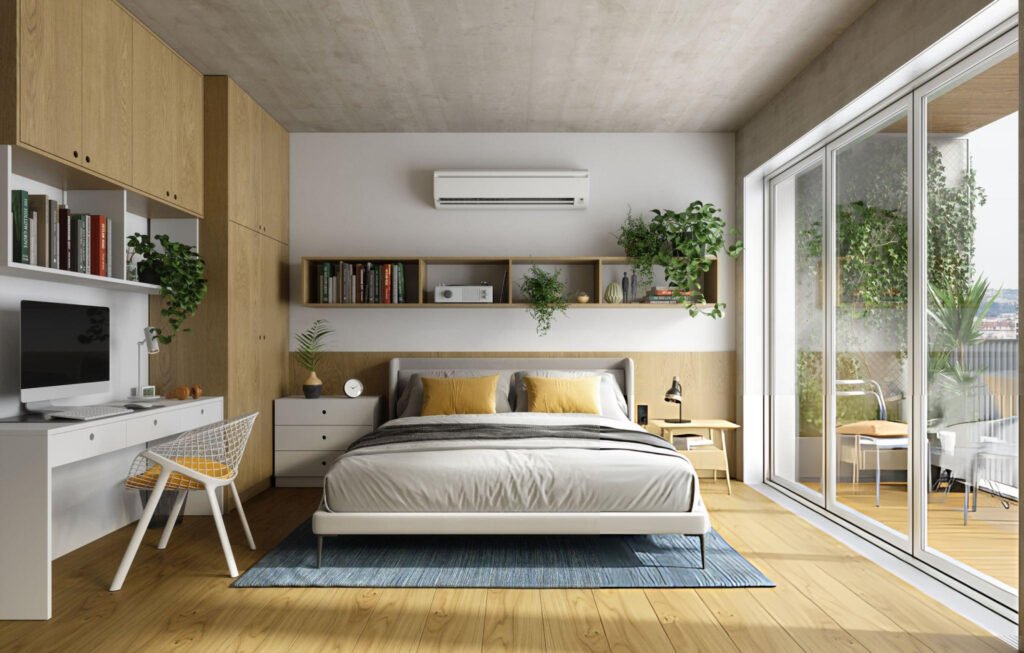
Setting up a workspace in a cramped bedroom seems impossible until you’ve done it. I’ve been working from home for years, and figuring out how to fit a functional office into a bedroom that barely fits a bed was tough.
If you’re in the same situation, you already know that most remote workers don’t have spare rooms. You’re working with limited square footage and need a workspace that won’t strain your back.
This guide covers designing an ergonomic home office layout design that fits tight bedroom spaces without sacrificing comfort or productivity.
You’ll learn proven strategies for maximizing small spaces while maintaining proper ergonomics and separating work from rest areas.
Key Takeaways:
- Ergonomic setups reduce musculoskeletal disorders by 60% and boost productivity by 20%
- Proper desk and monitor positioning prevents neck strain and long-term health issues
- Multi-functional furniture maximizes limited bedroom space
- Strategic layout planning separates work zones from sleep areas
- Vertical storage keeps floor space clear
Why Does Ergonomics Matter in Small Home Offices?
Why Ergonomics Matters
Working from a bedroom doesn’t mean you skip the basics of good posture. Poor ergonomic setups lead to serious physical problems over time.
Studies show that proper ergonomic office environments reduce work-related musculoskeletal disorders by up to 60% and increase productivity by 15-20%. Here’s why those numbers matter: your body isn’t designed to hunch over a laptop on your bed for eight hours. When your workspace doesn’t support neutral body posture, you develop:
- Neck pain
- Shoulder tension
- Lower back strain
- Wrist issues
The physical toll isn’t the only problem. Uncomfortable setups also destroy focus. You’re constantly shifting around, trying to get comfortable instead of working.
Key Ergonomic Elements
Getting ergonomics right in small bedroom offices comes down to four core elements:
- Desk height: Your elbows should rest at 90-degree angles when typing, though most standard desks are actually too high for shorter individuals.
- Chair support: An ergonomic chair with adjustable height and lumbar support prevents chronic back pain.
- Monitor placement: Screen tops should be at or slightly below eye level, approximately 20-26 inches from your face.
- Keyboard and mouse positioning: Keep wrists straight and reduce strain by placing them properly.
- Proper lighting reduces eye strain and headaches. Natural light works best, but task lighting fills gaps when windows aren’t available.
How Do You Assess Your Bedroom Space for a Home Office?
Measuring and Mapping the Room
Before buying furniture, know exactly what you’re working with. Start by measuring your bedroom’s length, width, and architectural features such as alcoves or slanted ceilings.
Professional designers recommend the following space requirements for workstations:
- Width: 60 inches
- Depth: 84 inches
- Walking space around bed: 24-36 inches on each side for comfortable movement
However, bedrooms rarely offer that luxury. Sketch a floor plan showing door swings, windows, and outlets.
| Room Size | Desk Size | Chair Clearance |
| Under 100 sq ft | 36-42″ wide | 30″ behind |
| 100-150 sq ft | 42-48″ wide | 36″ behind |
| 150+ sq ft | 48-60″ wide | 40″ behind |
Identifying High-Traffic and Quiet Zones
High-traffic areas near doors and closets aren’t ideal for focused work. Corners and alcoves opposite the main entrance work better. Position desks perpendicular to windows for light without screen glare.
Multi-Purpose Considerations
Your bedroom still functions as a bedroom. Placing desks facing beds creates psychological disasters. Physical or visual separation helps maintain boundaries.
Use room dividers, curtains, or strategically placed furniture to create this separation.
Storage Assessment
Clutter kills productivity. Vertical storage works best for tight spaces:
- Wall-mounted shelves—Keep items accessible without eating floor space
- Pegboards—Versatile organization that adapts to changing needs
- Floating cabinets—Storage that doesn’t consume floor real estate
- Under-bed rolling bins—Efficient storage for files and supplies
Cable Management and Power Access
Outlets determine where setups can go. Count outlets near potential desk locations.
Essential cable management tools:
- Cable management boxes
- Cord clips
- Velcro ties
- Surge protectors with USB ports (helpful when outlets are limited)
How Should You Plan Your Home Office Layout Design in a Bedroom?
Desk Placement Options
Where you put your desk makes or breaks the setup:
- Against-wall placement is most common for tight bedrooms, maximizing floor space and creating defined boundaries, though the downside is feeling boxed in.
- Corner setups use dead space efficiently and provide more surface than straight desks. L-shaped corner desks fit these areas particularly well.
- Floating arrangements work well when you have extra room, providing better spatial awareness and access to natural light, but they require significantly more clearance.
- Window-adjacent placement provides natural light and views, improving mood and reducing eye strain. However, ensure screens don’t face windows directly, as this can cause glare.
| Desk Placement | Pros | Cons | Best For |
| Against Wall | Maximizes space | Feels confined | Under 120 sq ft |
| Corner | Uses dead space | Limited desktop | Awkward shapes |
| Floating | Better flow | Needs 40+ inches of clearance | Over 150 sq ft |
Chair and Seating Arrangement
An ergonomic chair is the most important furniture investment, especially if you sit for hours each day. Budget chairs without lumbar support destroy your lower back.
Look for:
- Adjustable seat height
- Adjustable backrest
- Lumbar support
- Seat depth adjustment
- Armrest control
Herman Miller Aerons cost over $1,000 new, but cheaper alternatives like the Autonomous ErgoChair offer solid ergonomics at a lower price.
Compact chairs are essential in tight bedrooms because full executive chairs consume space you don’t have.
Equipment and Technology Setup
Monitor and laptop setup guidelines:
- Position monitors directly in front at arm’s length
- Screen tops should sit at or slightly below eye level
- If using laptops as main displays, invest in laptop stands
- Pair laptop stands with external keyboards and mice to prevent hunched posture
For printer placement, rarely used ones go elsewhere, but frequent printing needs dedicated shelf space. Control cable chaos with clips along desk edges and velcro ties to bundle cords neatly.
Lighting and Ambience
Well-lit workspaces boost productivity by 20%. Natural light improves mood and alertness, though bedrooms don’t always have great window access. Task lighting fills those gaps.
Desk lamps with adjustable arms and brightness let you control light direction. Look for color temperature adjustment with cool white during work and warm white evenings.
Accessibility and Workflow Optimization
Your desk layout should support how you work. Keep frequently used items within arm’s reach. The mouse and keyboard sit directly in front.
Notebooks and pens go in desk drawers beside your keyboard. Reference materials belong on nearby shelves. Strategic organisation eliminates wasted motion.
What Are the Best Space-Saving Techniques for Bedroom Offices?
Vertical Storage Solutions
When floor space is limited, build upwards:
- Wall-mounted shelves—Hold books and supplies without taking desk real estate; install above desks for easy reference
- Floating shelves—Create visual interest while staying functional
- Pegboards—Incredibly versatile; mount organizers, hooks, and small shelves wherever needed; adapt to changing needs without requiring new holes
- Wall-mounted monitor arms—Free up desk space by holding screens above surfaces while allowing easy height adjustments
Foldable and Multi-Purpose Furniture
Space-saving furniture options:
- Murphy desks—Fold up against walls when not in use, completely hiding your workspace; perfect for strict work-life separation
- Foldable chairs—Hang on walls or tuck into closets to prevent bedrooms from feeling like permanent offices
- Secretary desks—Combine storage cabinets with fold-down work surfaces; look like regular furniture when closed, but provide functional workspace when opened
- Wall-mounted drop-leaf tables—Offer desk space only when needed
Decluttering and Minimalism
Small bedroom offices cannot tolerate clutter. Every desk item should serve a purpose. If you haven’t used it in a week, it doesn’t belong there. Implement daily cleanup routines.
Spend five minutes at the end of the workday to clear your desk and return items to their designated spots. Scan documents instead of keeping physical copies whenever possible.
Digital storage eliminates the filing cabinet. Use drawer organizers and cable boxes to contain small items. Visual chaos creates mental chaos, especially in sleep spaces.
Zoning and Partitioning
Creating psychological separation between work and sleep areas improves productivity and rest quality.
Physical dividers, such as folding screens or curtains, let you “close” your office at the end of the workday.
Area rugs define workspace zones visually without permanent changes. Place one under your desk to distinguish it from the bedroom.
Lighting creates zones effectively. Bright task lighting over desks during work hours contrasts with softer bedroom lighting. Paint or wallpaper accent walls behind desks to visually separate space.
What Are Some Practical Home Office Layout Examples for Bedrooms?
Single-Person Bedroom Office
The most common setup involves a compact desk against the wall opposite or perpendicular to the bed. A 42-48 inch desk fits most bedroom walls without overwhelming the space.
Position an ergonomic chair that tucks completely under the desk when not in use.
Mount floating shelves above the desk at eye level for books and supplies. Add a desk lamp on one side and a small plant on the other for visual balance.
A monitor sits centered on the desk with a laptop stand or keyboard tray below it. Cable management clips keep cords running along the desk’s back edge and down the wall to the outlet.
This layout keeps the work zone compact while maintaining clear floor space for movement around the bedroom.
Positioning your desk facing away from the bed creates a psychological separation between work and rest.
Shared Bedroom Office Setup
Two people working from the same bedroom present unique challenges. L-shaped or parallel desk arrangements work best.
Placing two small desks on opposite walls creates individual zones. Each person has a defined workspace without feeling cramped or distracted by others.
Corner desk configurations allow two workstations to meet at a right angle. This setup maximizes space efficiency while maintaining some visual separation.
Privacy considerations matter in shared setups. Use small desk dividers or strategically place monitors to block direct sightlines between workstations.
Storage becomes more critical when two people share supplies. Assign specific shelves or drawer sections to each person to prevent territorial issues and maintain organization.
Sound management is crucial. Noise-canceling headphones help when one person takes calls while the other focuses on quiet work.
Compact Desk Solutions for Tight Spaces
Rooms under 100 square feet demand creative solutions. Floating desks mounted directly to walls provide work surfaces without floor-standing legs.
They typically measure 36-40 inches wide and 16-20 inches deep, perfect for laptop work but too small for extensive equipment.
Corner desks use space in room corners. Triangular designs fit snugly into corners while providing a surprising work surface. Some models include built-in shelving on the vertical walls.
Nightstand desks serve dual purposes in extremely cramped quarters. A desk placed beside the bed serves as both a workspace and a bedside table.
This requires strict discipline about clearing work items before sleep. Wall-mounted fold-down desks offer the ultimate space-saving solution, providing full desk functionality when needed and folding flat against walls when not in use.
How Can You Optimize Your Bedroom Office Layout for Productivity?
Time-Saving Arrangements
Productivity drops when you waste time hunting for supplies. Apply these organization principles:
- Keep daily essentials within arm’s reach while seated
- Use drawer dividers to create specific homes for different item categories
- Label drawers if you share space or tend to forget where items belong
- Position your most-used items on your dominant side (right-handed people should place the mouse, phone, and frequently grabbed supplies on the right side of the desk)
- Eliminate unnecessary reaching to keep the workflow smooth
Personalization Without Clutter
Your workspace should feel inviting without becoming chaotic. One or two meaningful items, such as a small plant or a framed photo, can make the desk feel personal. More than that starts creating visual noise.
Plants improve air quality and mood, but choose low-maintenance varieties like pothos or snake plants. They don’t need constant attention and survive less-than-ideal lighting.
Color choices affect energy levels. Yellows and oranges promote energy and creativity. Blues and greys are calming but potentially too relaxing for productive work. Green provides a good balance between energy and calm.
Tech and Cable Management Tips
Cable chaos makes even spacious setups feel cramped. Effective cable management solutions:
- Velcro cable ties—Bundle multiple cords together cleanly
- Cable clips—Attach to desk edges and walls, guiding cords along specific paths
- Cable management boxes—Hide power strips and excess cord length
- Wireless peripherals—Reduce cable count significantly (wireless keyboard and mouse eliminate two cables immediately)
- Wireless charging pads—Eliminate phone charging cables from your desk
Maintenance and Adjustments
Your optimal layout evolves as your work changes. Reassess your setup quarterly.
Are you still using that printer enough to justify its desk space? Has your monitor position drifted off-centre? Make incremental adjustments rather than complete overhauls.
Raising your chair height by one notch or shifting your monitor slightly to the left costs nothing but can significantly improve comfort. Track any recurring discomfort to identify needed adjustments.
Common Mistakes in Bedroom Home Offices
- Ignoring ergonomics in tight spaces: People convince themselves that compact setups can’t be ergonomic. Even small desks support proper posture when the chair and monitor are positioned correctly.
- Blocking natural light: Poor desk placement wastes free productivity boosts. Windows should enhance workspaces, not be covered by your back while working.
- Overcrowded storage: Just because vertical shelving exists doesn’t mean you should cram every wall with shelves. Leave breathing room.
- Using bedroom furniture as office furniture: Your dining chair isn’t built for eight-hour work sessions. Your nightstand isn’t desk height. Invest in proper equipment.
- Neglecting cable management: Tangled cords create visual noise that constantly reminds you of disorganization and makes spaces feel more cluttered than they actually are.
Conclusion and Actionable Steps
Designing an ergonomic home office in tight bedroom spaces is possible with intentional planning.
Focus on three core elements: proper desk and chair positioning for ergonomic support, strategic layout that separates work and sleep zones psychologically, and vertical storage solutions that maximize functionality without consuming floor space.
Start small. Measure your available space and identify the best location for your desk based on natural light and power access.
Invest in an ergonomic chair first, since it has the biggest impact on daily comfort. Add vertical storage gradually as you identify which supplies you actually need to keep accessible.
Your bedroom office should support productivity during work hours and promote rest during off-hours. With the right layout, even the tightest spaces can become functional, comfortable workplaces.
FAQ Section
How can I make a small bedroom office comfortable?
Comfort in small bedroom offices requires ergonomic fundamentals regardless of space constraints.
Invest in an adjustable chair with proper lumbar support. Position your monitor at eye level using a laptop stand or monitor arm to prevent neck strain.
Keep frequently used items within arm’s reach to minimize stretching. Add an adjustable brightness desk lamp to reduce eye strain. Use a small fan or space heater to control temperature.
What is the most productive bedroom home office layout?
The most productive layout positions your desk perpendicular to, or opposite, your bed rather than facing it, creating psychological separation. Place your desk near a window for natural light, but not directly facing it to avoid screen glare.
Position your chair so you face away from high-traffic areas, such as doorways. Use vertical storage above and beside your desk rather than spreading supplies across multiple surfaces.
How do I design a home office with limited space?
Designing for limited space requires prioritizing function over aesthetics. Start with exact measurements of your available area.
Choose wall-mounted or floating desks that don’t require floor space and have no legs. Opt for corner desk configurations to use dead zones.
Install floating shelves above your desk for storage rather than floor-standing bookcases. Use multifunctional furniture, such as desks that double as nightstands, in extremely tight quarters.
What desk size works best for tight bedroom spaces?
Desk size depends on your actual work needs. For laptop-only work, a 36-40-inch-wide desk with a 16-20-inch depth provides adequate space.
If you use an external monitor, keyboard, and mouse, aim for a width of 42-48 inches, with a minimum depth of 24 inches.
Measure your clearance before buying. You need at least 30 inches behind the desk for chair movement.
How do I mentally separate my workspace from my bedroom?
Mental separation requires intentional rituals and physical cues. Use visual dividers like curtains, folding screens, or bookcases to create distinct zones.
Establish start-of-day and end-of-day routines, such as opening and closing your laptop or turning off and on the lights.
Change your lighting between work and relaxation modes. Avoid working in bed, as it disrupts sleep associations.