
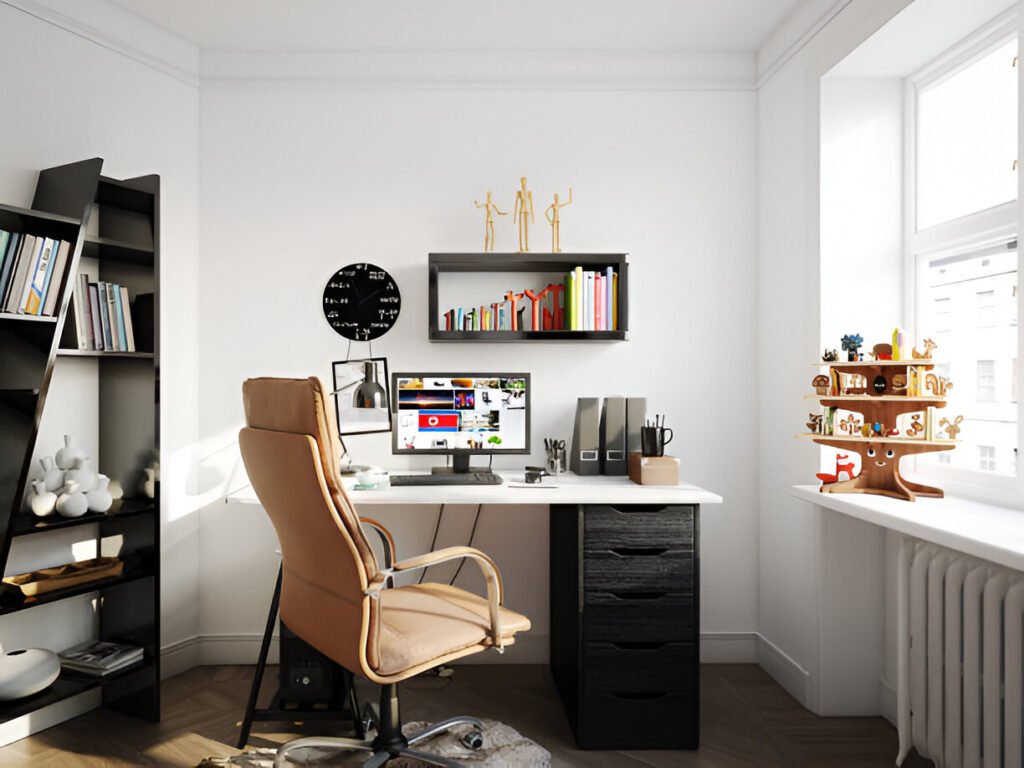
Your chair isn’t just office furniture. It’s where you’ll spend 40+ hours every week, and choosing wrong means dealing with back pain, neck strain, and that awful feeling when you stand up after three hours.
I used to think any chair would do the job as long as it looked decent. That changed after six months of lower back pain that wouldn’t go away, which forced me to recognise what research has consistently shown: poorly designed chairs force your muscles to compensate for a lack of support, leading to fatigue.
Determining the best office chair for a home office depends entirely on how you work, but even more critically, on how the chair fits your specific body.
The most upvoted advice in chair discussions is simple: ‘try them first’—users who purchased premium chairs online without sitting in them first report having to return purchases due to fit issues like armrest width problems, which is why visiting showrooms or leveraging 30-day trial periods prevents costly mistakes with expensive chairs that don’t match your frame.
Finding the best office chair for working from home starts with understanding what your body needs during long desk sessions.
Quick Takeaways:
- Ergonomic features prevent long-term back and neck problems
- Adjustability matters more than price for proper fit
- Different work styles need different chair types
- Gaming chairs aren’t designed for productivity work
- Budget options under $300 can provide real ergonomic support
Who This Guide Is For
Remote workers pulling full-time hours need chairs that support 8+ hour days. If your home setup isn’t temporary anymore, that kitchen chair you’ve been using is causing back strain.
Students face different demands. Study sessions that stretch from morning lectures to late-night assignments require flexibility and comfort without the $1,000 price tag.
Content creators sit differently, too. Hours of editing, writing, or streaming mean you’re locked into focused postures that demand proper lumbar support and armrest positioning.
These distinctions matter because sitting duration determines which features become critical versus merely nice to have. Full-time remote work means your chair is your workstation.
Students may split their time between desk work and floor study, making mobility necessary. Creators often lean forward during editing or recline during content review, which demands different adjustment ranges than standard office tasks.
How to Choose a Chair for a Home Office (Buyer Framework)
Sitting Time and Work Style Assessment
Short sitting bursts under two hours are forgivable with mediocre chairs, but extended sessions expose every design flaw and turn minor discomfort into persistent problems. Creative work involving writing, design, or strategy involves varied postures throughout the day.
You’ll lean back during thinking phases, sit upright during execution, and shift constantly. Typing-intensive work locks you into one position for hours, so lumbar support becomes critical because your back muscles can’t take breaks when you don’t.
Ergonomics vs Comfort: What Actually Matters
Ergonomic support follows your spine’s natural S-curve. According to spine health research, the lumbar region curves inward at 25-45 degrees when standing, and sitting flattens that curve by half.
Chairs with adjustable lumbar support maintain the inward curve, preventing the slouch that strains the lower back.
While comfort features feel nice initially, they don’t address the underlying posture mechanics your body requires. Plush padding without proper back contouring leads to sink-in seating that forces poor alignment.
The best ergonomic chair and desk combinations prioritize structure over softness by focusing on critical support points: lumbar contact that maintains your lower back curve, proper seat depth that supports your thighs without pressure behind the knees, and armrests positioned at elbow height to keep joints at neutral angles.
Home office chair ergonomic desk chair mesh designs excel at providing this structured support because mesh conforms to your back shape while maintaining firmness.
The ideal chair delivers both dimensions: comfort makes the chair pleasant to use, while ergonomics ensures that comfort doesn’t come at the expense of your long-term physical health.
Adjustability Features You Should Not Compromise On
Seat height adjustment is non-negotiable. Your feet should rest flat with knees at 90 degrees and thighs parallel to the floor.
Proper setup requires a 2-inch gap between the front of the seat and the backs of your knees to maintain healthy circulation. Most people need heights ranging from 16-21 inches off the ground to achieve this position.
Armrests need height adjustment at minimum. Fixed armrests force awkward shoulder positions, leading to neck strain.
Adjustable-height desk chairs with 2D or 3D armrests let you position the armrests so your shoulders stay relaxed while typing.
Backrest tilt and lock prevent that spring-back effect where the chair fights you. Locking mechanisms let you find your preferred recline angle and stay there without constant tension.
Space, Desk Height, and Room Aesthetics
Small rooms demand chairs with compact footprints. Traditional executive chairs with wide bases eat up floor space that home offices can’t spare.
Before purchasing, measure your workspace to ensure there is clearance for the chair to recline.
Body fit trumps brand prestige—one user had to return a Herman Miller purchase because ‘the armrests were way too wide for my shoulders.’
At the same time, another noted that even premium chairs feel ‘annoying fast’ when they don’t match your body perfectly, which is why the most consistent advice from actual owners is to try chairs in person before purchasing rather than buying online based on reviews.
Desk height compatibility matters more than most people realize. Standard desks are 28-30 inches high; if yours is higher or lower, your chair must compensate, or you won’t achieve proper ergonomic alignment.
Contemporary desk chair aesthetics matter when your office doubles as a living space. Mesh office chairs work well in modern homes, while leather home office chairs suit traditional spaces.
Because your chair remains visible all day, choosing something that integrates with your existing decor helps the space feel intentional rather than makeshift.
RELATED: 11 Small Home Office Layout Ideas and Tips That Make Working From Home Actually Enjoyable
What Are The Types of Home Office Chairs
Ergonomic Office Chairs
Ergonomic designs prioritize spinal alignment and adjustability. Lumbar support adjusts to match your lower back’s curve, while breathable mesh backrests help prevent discomfort that builds during the summer months or in poorly ventilated spaces.
These chairs are best suited for long work hours because proper support reduces muscle fatigue that builds up during extended sitting.
Home office and ergonomic mesh desk chair options dominate the market because they address heat without sacrificing support.
The Branch Verve uses 3D knit that breathes while contouring. Herman Miller’s Aeron uses pellicle mesh that flexes with movement. Mesh office chairs provide better airflow than padded alternatives.
Mesh Office Chairs
Ventilation advantages eliminate back sweat caused by padded chairs by allowing air to circulate continuously through the material.
Users consistently report that this matters during extended sessions, with comments noting ‘mesh airflow actually matters when you sit long hours’ and preferences for mesh ‘if you sit hot,’ particularly in chairs offering mesh backs with foam seats that provide ‘cushioning without sweating through leather’ during all-day use.
This makes mesh particularly valuable for warm climates or offices without adequate air conditioning.
Quality mesh matters enormously. High-end versions use tensioned fabric that supports without sagging. Budget mesh stretches out over months.
Leather Home Office Chairs
Professional aesthetics make leather popular for client-facing offices. They photograph well on video calls.
However, leather requires consistent maintenance to prevent cracking and can become uncomfortably hot during extended sitting.
Executive desk chair models for home offices typically use leather because appearance is prioritised over comfort in professional settings.
The cost difference between materials is substantial. Real leather costs significantly more than synthetic alternatives, while bonded leather begins peeling within two years of regular use.
Fabric Desk Chairs with Wheels
The fabric is soft and stays cool, making it comfortable for long sessions. Durability suffers because the fabric stains easily and wears through at contact points. This makes fabric best for casual home offices where appearance matters less.
Padded fabric desk chairs work well for part-time remote workers, but full-time workers should evaluate whether standard fabric chairs can withstand the demands of daily use over the long term.
Armless and Minimalist Desk Chairs
Space-saving benefits make armless options attractive for tiny offices. Without armrests, chairs tuck completely under desks. Armless office chairs allow you to sit cross-legged or in various positions.
This design works best in small spaces, when paired with standing desks, or for users who prefer alternative sitting styles.
The tradeoff involves shoulder and neck strain. Arms supported at elbow height reduce upper body tension throughout the workday.
Going armless means your shoulders carry the full weight of your arms all day. Chairs for desktop workstations typically require armrests to ensure proper ergonomics.
Plush and Armchair-Style Office Chairs
Comfort-first designs prioritize padding and softness. Plush office chairs feel luxurious initially, and armchair office chair styles bring living room comfort to desk work.
However, extended sitting in plush chairs causes posture collapse. Without firm support, your body sinks and loses spinal alignment over time. Plush works for occasional use but fails during 8-hour workdays.
Gaming Chair vs Office Chair for Home Office
Are Gaming Chairs Good for Home Office Work?
Design intent explains the limitations. Gaming chairs mimic racing car bucket seats with high sides, deep recline, and aggressive styling.
Race seats secure drivers during sharp turns, but that design does not translate well to stationary desk work. According to ergonomic analysis, bucket seat designs restrict movement and reduce available seating width.
The raised sides that look appealing create practical problems. Larger users find them uncomfortable. People who sit cross-legged can’t. The constrictive design presses against your legs and restricts circulation during long sessions.
Sitting posture differences matter more than aesthetics. Gaming sessions involve controller use with arms forward, which differs significantly from keyboard typing where arms need support at desk height.
Gaming chairs include lumbar and neck pillows that shift around instead of integrated support that adjusts precisely.
Productivity work requires consistent back contact and proper lumbar positioning that removable pillows can’t provide reliably.
I found that many people who purchased gaming chairs for work-from-home setups consistently report switching to ergonomic office chairs after experiencing persistent issues—one user noted that their gaming chair was causing sciatica, which resolved after upgrading to a Steelcase Leap II.
At the same time, another stated that everyone they know who uses gaming chairs for 15+ hours weekly experiences back, neck, or spine pain.
Should You Get a Gaming Chair for Your Home Office?
Who benefits from gaming chairs: people who actually game extensively and need deep recline for controller comfort.
Streamers who spend hours in one spot and prioritize the aesthetic for on-camera work. Users under 30 with no existing back problems who value style over ergonomic optimization.
Who should avoid them: anyone sitting 6+ hours daily for productivity work. People with back pain history. Users over 5’10” or under 5’6″ may need a different gaming chair size, as standard sizes are narrow and assume average height.
Remote workers who need chairs supporting varied postures throughout long workdays. Professional environments where racing-style aesthetics look out of place on video calls.
Quick Comparison Table
Gaming Chair vs Ergonomic Office Chair
| Feature | Gaming Chair | Office Chair |
| Comfort | Plush padding, deep recline | Firm support, moderate recline |
| Posture | Pillowed support (shifts) | Integrated lumbar (stays positioned) |
| Aesthetics | Bold, racing style | Professional, understated |
| Work Suitability | Short sessions, gaming | All-day productivity |
Best Home Office Chairs by Category
Best Desk Chair Under $300
Value-focused features include basic adjustability like seat height, armrest height, and tilt lock without premium mechanisms. Trade-offs include shorter warranties and materials that wear faster under heavy use.
The Ticova Ergonomic chair dominates recommendations. Priced around $160-200, it delivers adjustable lumbar support and breathable mesh.
However, buyers in the $300-400 range should consider the used premium market—refurbished Herman Miller Aeron chairs commonly sell for $200-$400 in major cities according to actual owners.
In contrast, Crandall Office Furniture sells refurbished Steelcase Leap V2 chairs with upgrades for just over $500 compared to $900 new, a strategy one furniture professional described as ‘almost always the answer’ for home office buyers.
The Colamy Kirin offers similar features at $159 with modern aesthetics. Both provide functional ergonomics without premium pricing. Best desk chairs under $300 sacrifice options and durability but maintain core support features.
Best Executive Desk Chair for Home Office
Professional look means high backs and premium materials. Comfort for long hours requires thick padding balanced with proper lumbar structure.
The Haworth Soji offers genuine ergonomics with executive styling around $500-650, including a 12-year warranty. Executive desk chairs for home office selections balance appearance with function.
Best Comfortable White Desk Chair
Aesthetic appeal drives white chair popularity. Maintenance becomes critical because white fabric stains easily and white leather shows wear.
The Branch Verve Chair offers white options with 3D knit fabric that stays cleaner than traditional upholstery. Comfortable white desk chair choices need material durability.
Best Adjustable Height Desk Chairs
Desk compatibility matters when desks vary from the standard 29-inch height. Standing desk users need chairs reaching low enough at sitting height and high enough for perching positions.
Adjustable-height desk chairs with extended ranges accommodate both scenarios. Standard cylinders adjust 4-5 inches, while extended-range cylinders provide 7-9 inches of adjustment.
Best Minimalist and Contemporary Desk Chairs
Modern offices demand chairs that don’t scream corporate. Clean lines and neutral colors help contemporary desk chair aesthetics integrate with residential spaces.
Branch and HAG Capisco offer sculptural forms that work as furniture pieces. Minimalist designs keep visual weight low, making rooms feel larger.
Common Home Office Chair Buying Mistakes
Choosing style over support kills productivity. That perfect chair with zero adjustability looks great and feels terrible hour three.
Ignoring adjustability seems fine until the chair doesn’t fit. Fixed armrests at wrong heights cause shoulder pain. The non-adjustable lumbar support does not fit your back curve.
Buying gaming chairs for productivity backfires when bucket seats restrict the movement and position changes your body needs during long work sessions.
Overlooking desk height compatibility creates ergonomic disasters. Measure desk height and verify the chair’s range works before buying.
Quick Home Office Chair Selection Checklist
- Seat height adjusts to place feet flat, knees at 90 degrees
- Lumbar support adjusts or contours to lower back curve
- Armrests adjust to elbow height when shoulders relaxed
- Backrest reclines and locks at preferred angles
- Seat depth leaves 2-inch gap behind knees
- Material suits climate (mesh for warm, padding for cold)
- Warranty covers expected usage duration
- Budget allows proper features over cheap construction
Summary: Choosing the Best Home Office Chair for Your Needs
Remote workers need durability and full adjustability for 8+ hour days. Invest in chairs with proper lumbar support, armrest positioning, and seat depth. The Branch Ergonomic Chair Pro and Steelcase Series 1 balance features with cost.
Students benefit from budget-friendly options. The Ticova or Colamy Kirin provide support without premium pricing.
Creators require flexibility for different postures. Look for chairs with good recline ranges and adjustable armrests.
Choosing an office chair for home use starts with an honest assessment of sitting duration. Selecting a home office chair for remote work means balancing budget against longevity.
FAQ Section: Home Office Chair Questions
What is the best chair for a home office if I sit all day?
Ergonomic chairs with adjustable lumbar support prevent long-session discomfort.
The Herman Miller Aeron remains the benchmark with pellicle mesh that breathes well and three sizes that fit different body types.
The Steelcase Gesture accommodates multiple sitting positions, which matters because nobody maintains perfect posture for eight hours.
Budget alternatives include the Branch Ergonomic Chair at $499 or Haworth Soji around $500-650.
Focus on seat height adjustment, lumbar positioning, and armrest flexibility. All-day sitting requires proper back support more than plush padding.
How do I choose a chair for home office work on a budget?
Prioritize core ergonomic features over premium materials. The Ticova Ergonomic chair at $160-200 includes adjustable lumbar and breathable mesh. The Colamy Kirin offers similar value at $159 with solid build quality.
Budget shopping means accepting shorter warranties and less refined adjustments. Users report a consistent pattern where budget chairs under $200 feel adequate initially but deteriorate within months.
As one highly upvoted comment noted, ‘$150 chair felt fine for 3 months and then slowly wrecked their back,’ a pattern attributed to cheap chairs copying appearance while using inferior foam density, mesh tension, and tilt mechanisms that don’t maintain alignment over time.
Look for at least seat height adjustment and basic lumbar support. Avoid options under $100 because they lack essential adjustments. The $150-300 range provides real ergonomic value.
Is a mesh office chair better than a padded desk chair?
Mesh wins for breathability and temperature control. Sitting for hours in padded chairs causes back sweat, especially in warm climates.
High-quality mesh like Herman Miller’s pellicle provides firm support while maintaining airflow. Mesh conforms to your back without losing structure.
Padded chairs offer initial softness some prefer, and they work better in cold environments.
Thick padding compresses over time, creating uneven pressure points. If you run hot, mesh solves problems padding creates.
Are armless office chairs good for long hours?
Armless chairs create problems during extended sitting. Without armrests, your shoulders and neck muscles support your arms’ weight all day, leading to upper body tension. Properly adjusted armrests reduce shoulder strain significantly during keyboard work.
Armless designs suit users who sit cross-legged, need maximum desk clearance, or pair chairs with standing desks.
They save space in tiny offices. For standard long-hour desk work, adjustable armrests prevent cumulative strain.
Which office chair works best for content creators and remote workers?
Flexibility matters most. Content creation involves varied postures: leaning forward during editing, reclining during review, and sitting upright during writing.
The Steelcase Gesture accommodates position changes with armrests that adjust three-dimensionally.
Remote workers need durability alongside adjustability. The Branch Ergonomic Chair Pro at $499 delivers both.
Creators should prioritize chairs with good recline mechanisms and armrests that move out of the way. Skip ultra-minimalist options that sacrifice adjustability.